Amid significant financial pressures affecting higher education across Washington and the nation, Shoreline College has reached a collaborative agreement with its faculty union that prevents faculty layoffs and establishes a framework for addressing future budget challenges.
This agreement comes as the College works to close an approximately $4 million budget gap projected over the next three years. Shoreline has implemented a combination of operational reductions, hiring freezes, and workforce adjustments with a continued focus on minimizing impacts to students and preserving access to programs that support both transfer and workforce pathways. In evaluating potential reductions, the College relied on enrollment data and other operational factors to identify changes that would have the least impact on students.
Formalized through a Memorandum of Understanding (MOU), the agreement establishes a voluntary option for eligible faculty to reduce their workload ahead of retirement and/or provide advance notice of retirement plans. This approach generates both immediate and ongoing cost savings while preserving faculty positions and supporting continuity for students.
“Typically, the President is not in a position to work directly with the Union on issues like this. However, our collective bargaining agreement outlines the opportunity to work collectively on discussions around reductions in force. I genuinely enjoyed working with the Union team who were very conscientious, reliable, and creative in all of our discussions. They clearly had the goal to support faculty as is their role and were really trying to find solutions that would help us prepare for both current and possible future financial scenarios,” shared Dr. Jack Kahn, President of Shoreline College.
As a result of this agreement, the College has rescinded previously issued faculty RIF notices scheduled to take effect on July 1. While the College’s collective bargaining agreement (CBA) outlines a required process for discussing faculty reductions, both the College and the union chose to go beyond those minimum requirements, extending conversations and working collaboratively to identify a solution that could better support faculty, students, and the institution as a whole.
This work comes during a period of exceptional strain for higher education. Across Washington, many community and technical colleges are making difficult reductions to faculty, staff, administrative positions, and academic programs as they respond to state budget pressures and broader institutional challenges.
This new agreement offers a more student-centered alternative by preserving faculty positions while also giving the College additional flexibility to continue evaluating and strengthening programs over time to meet changing student, community, and workforce needs.
“Our faculty’s active solidarity, as a labor union, enabled us to successfully negotiate alternatives to the College’s proposed layoffs. We appreciate that the College went beyond what our CBA required and engaged us in a good-faith collaboration to find alternatives that saved jobs, and opened up additional possibilities that faculty have long sought,” shared Eric Hamako, President of the faculty’s labor union, AFT Local 1950.
The MOU was developed through months of discussion and problem-solving between college leadership and faculty union representatives. It reflects a shared commitment to protecting educational quality while also responding responsibly to ongoing financial realities.
In addition to avoiding immediate faculty layoffs, this voluntary program provides a potential model for future collaboration should additional state-level reductions occur.
Shoreline College leadership also expressed appreciation for the engagement of faculty, staff, and community members throughout the process, particularly those who participated in recent Board of Trustees discussions.
“This collaborative work between the union and college is an outstanding example of people coming together to support our educational efforts in challenging times,” said Kim Wells, Shoreline College, Board of Trustees Chair.
While this agreement represents meaningful progress, it does not eliminate the broader financial barriers facing the College, including federal and state funding challenges and declining enrollment trends. Shoreline continues to make difficult decisions across the institution, including reductions in other areas, as it works to address ongoing budget pressures and preserve student access, educational quality, and long-term sustainability. However, this effort demonstrates what is possible when institutions and their employees work together to find thoughtful, student-centered solutions.
The financial aid office will be closed Monday, April 27 through Thursday, April 30 for staff training and preparation for 2026-2027 processing. We will resume normal business hours on Monday, May 4.
Shoreline College students Atanu Baishnab and Camelia Liang have been selected for the 2026 All-Washington Academic Team. This recognition honors academic excellence and community service among students at Washington’s 34 community and technical colleges.
Ninety-five students from across the state earned a spot on this year’s team, and each will receive a medallion and a $210 scholarship check from Key Bank. Additionally, Atanu and Camelia both ranked among the Top 16 in the state, earning each of them an additional $780 scholarship check from WSECU.
Atanu Baishnab is an engineering student who plans on transferring to Seattle Pacific University. While living in Bangladesh, Atanu worked for many years to earn enough money to study in the United States.
“I had no financial support, so I depended fully on myself. I worked all kinds of jobs and ran small side businesses to keep saving.”
Atanu wants to build a career where he can “contribute to the world by building better systems that support industries, create jobs, and help communities grow.”
On campus, Atanu provides support and mentorship to other students through his work as a Resident Assistant and his service on the Associated Student Government.
Camelia Liang is a nursing student whose educational goals include earning both bachelor’s and master’s degrees. Her career pathway became clear to her at 8 years old when, sitting in a hospital while her mother was in surgery, a nurse held her hand.
“At that moment, I realized that nurses are a source of security for all patients and their families, and I decided to dedicate myself to becoming the nurse I once needed.”
In addition to her schoolwork, Camelia devotes time to volunteering at organizations such as Seattle Children’s Hospital and the University of Washington Medical Center.
The All-Washington Academic Team is supported by the Washington Association of Community and Technical Colleges, the Washington State Association of College Trustees, and the State Board of Community and Technical Colleges, and Phi Theta, Kappa.
Scholarship support for students on the All-Washington Academic Team comes from KeyBank, Washington State Employee Credit Union, and the Washington State Association of College Trustees.
This year’s ceremony for the All-Washington Team will take place on April 23, 2026, at the South Puget Sound Community College Lacey Campus. Additional information is available on the SPSCC website.
If you don’t have a Shoreline ID card yet, mark your calendars – our spring quarter ID card event is coming up soon!
Current students, staff, and faculty can get ID cards made April 21-23. Stop by the FOSS Welcome Desk (Building 5000) between 8:30am – 4:30pm to pick up a number and get in line to take your photo! In addition to the daytime hours, we’ll also be available April 21 from 5pm – 7pm.
Please come prepared with your ctcLink number and a Photo ID (such as a driver’s license or passport).
If you have any questions, please email us at navigate@shoreline.edu.
Shoreline Fire Department & partner agencies will be on campus training at buildings 2300 and 800 from 04/13 through 04/17. There will be multiple fire engines and apparatus on campus during these times.
With both of these buildings being demolished in the near future, this presents an opportunity for emergency responders to practice “real life” scenarios.
You may see firefighters on the roofs practicing vertical venting (cutting holes in the roof), rappelling from elevated surfaces, and also using simulated smoke (fog machine) to resemble low visibility conditions. They will not actually be setting anything on fire.
Just a friendly reminder that the parking permit grace period for Spring Quarter 2026 is ending on Sunday, April 12th.
Parking permits will be required on campus starting Monday, April 13th.
Citations for lack of permit will begin on Monday, 4/13. Visitor lot violations, ADA violations, parking in multiple stalls, parking in assigned spots/lots, and other illegal and hazardous violations will still be cited.
Students: To purchase your student parking permit, please see cashiering (5200). Student permits are $45 plus tax and student housing permits are $90 plus tax.
Staff/faculty: Permits are available at Campus Safety (5102), please feel free to reach out to Safety & Security with any questions.
Any visitors to campus are welcome to use the pay stations, located at: Main Gate (in front of Bldg 7000), East Gate, and West Gate.
As we begin the spring quarter, we do so amid deeply troubling events at home and abroad. In a recent public post, the President of the United States wrote, “A whole civilization will die tonight, never to be brought back again. I don’t want that to happen, but it probably will.” Rhetoric that anticipates or normalizes the destruction of a people, their culture, and their history, particularly amid escalating threats of violence against Iran, stands in direct opposition to who we are as an institution and to our commitment to provide educational opportunity while expanding, celebrating, and learning from all human cultures. While this rhetoric has already changed to a “two-week warning” these words still have impact.
We want to be unequivocally clear: this college is home to Iranian faculty, staff, students, and community members. Iran and Iranian culture are part of the human community we value, protect, and learn from. To our Iranian community members, and to all who are affected by this moment: this is your space to learn, to work, and to be. You belong here.
In a related effort to marginalize and erase lived experiences, the U.S. Department of Education has rescinded key Title IX protections for transgender-identified people. While Washington State has continued to provide more proactive and affirming support, this reversal at the federal level represents a deeply troubling retreat from the obligation to protect access, safety, and dignity in educational spaces. Such actions undermine the inclusive purpose of public education and signal whose identities and lives are deemed worthy of protection. At Shoreline we support the rights of our transgender students and staff and will continue to strive to provide an inclusive and safe learning and working environment for all.
People often ask, “What can I do when these things happen in my community”? Often, the most meaningful place to start is with simple acts of care; checking in with a colleague, reaching out to a student, or being present for someone who may need support.
One of Shoreline’s greatest strengths is the compassion and humanity of this community. In times marked by violence, uncertainty, and grief, that care matters. Our college is not only a place of learning, but a place where we can also hold space for one another with empathy and understanding.
Should you or someone you know need support, please do not hesitate to connect with the following resources located below.
CAMPUS RESOURCES
Students may access the following services for support:
If you are experiencing distress related to this, please reach out to the Counseling Center for support.
In addition, for emergency counseling, referral, or assistance 24-hours/day and 7-days/week, please call:
King County: Crisis Connections (Crisis Line) | 866-427-4747
Snohomish County: Volunteers of America Care Crisis Response Services (Crisis Line) 800-584-3578
King County Sheriff’s Office (KCSO) SWAT will be conducting training at Building 800 on 04/08 & 04/09 between 10:00 a.m. and 6:00 p.m.
This is a great opportunity for KCSO to demonstrate proficiency in practical skills and tactics without having to worry about damaging the building itself. As many of you are aware, with the completion of the Bracken 8000 building, Building 800 is now scheduled to be demolished in the near future.
During these days you may notice officers in dark green uniforms, marked/unmarked police vehicles, and may hear loud noises throughout the day. KCSO will also be deploying signage on the perimeter of the area as well as safety observers.
The flyer below from KCSO describes the training more in depth as well as a point of contact from the Sheriff’s Office.
With spring quarter underway, we’re excited to begin sharing details about our upcoming Commencement celebration.
Commencement is an opportunity for Shoreline students who have completed their studies to celebrate their accomplishments with family, friends, faculty, and staff in a formal ceremony at the end of the school year.
This year’s Commencement ceremony will take place on Thursday, June 18, 2026
WHEN: 2:00 p.m.
WHERE: Shoreline College Gymnasium (building 3000)
The ceremony will also be live streamed for those who are unable to attend in person.
All students who have fulfilled their graduation requirements between Fall 2025 and Summer 2026 are eligible to participate in the 2026 Commencement Ceremony. Make sure you’re prepared by completing a Graduation Application and signing up to participate in Commencement.
Is there a student or faculty member that should be recognized for their contributions, growth, or positive impact? We invite you to nominate a graduating student for the Shoreline Student Service Award, or a graduating student or faculty member to serve as The Shoreline Commencement speaker. Self-nominations are welcome!
Nominations may be submitted using this form and should be received by April 9, 2026.
Please remember that Seattle is hosting two FIFA World Cup matches the same week as our Commencement ceremony. If you know of anyone coming from out of town, encourage them to book hotels early and plan for increased traffic throughout the week.
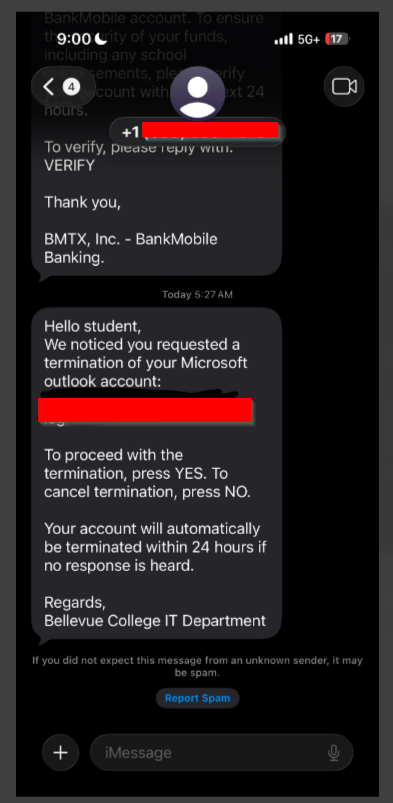
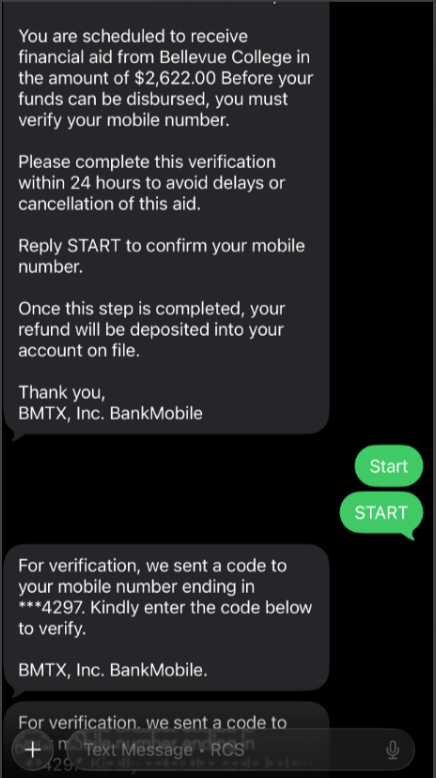
We have received reports of students getting fraudulent text messages asking them to provide Multi-Factor Authentication (MFA) verification codes. Once obtained, threat actors use these codes to access student accounts.
These messages may appear in various formats, making it extremely important that you remain vigilant and verify the legitimacy of any request before responding or sharing any MFA codes. Please note: Shoreline does not send MFA codes for account deactivation or to release financial aid funds.
If you receive an unsolicited or unexpected verification request, you should not respond to or interact with the message. Shoreline support staff are available to help if there are questions about the validity of any text message requests.
Below is an example of a fraudulent text sent to a student at Bellevue College (the student’s personal information has been removed).
If you have any questions, please visit the Support Center for assistance.