The semi-annual application for the Gilman Scholarship for study abroad is now open. Applicants must be receiving a Pell-grant (federal financial aid), or be Pell-grant eligible.
For more information, visit the Gilman Scholarship website. For helpful assistance with your scholarship application, please email studyabroad@shoreline.edu.
The Gilman Program is now accepting Gilman-McCain Scholarship applications! The Gilman-McCain Scholarship provides $5,000 awards for child and spousal dependents of active or activated duty military personnel who receive any type of Title IV Federal Financial Aid to study or intern abroad.
Student Deadline: Thursday, January 8, 2026, at 11:59pm Pacific Time
This cycle encompasses Spring 2026, Summer 2026, Fall 2026, and academic year 2026-2027 programs with eligible program start dates of February 1, 2026 to October 31, 2026. All applicants will be notified of their final status in February 2026.
Student applicants to the Gilman-McCain should be in-progress of applying for a specific study or intern abroad program.
For assistance in researching a good-fit program, email studyabroad@shoreline.edu
IMPORTANT NOTICE: Moving forward, we will only be offering scholarships annually. This application covers all scholarship funds for the 2025-2026 academic year. Prospective students may apply ahead of attending in the upcoming academic year. For more information, check our FAQ page.
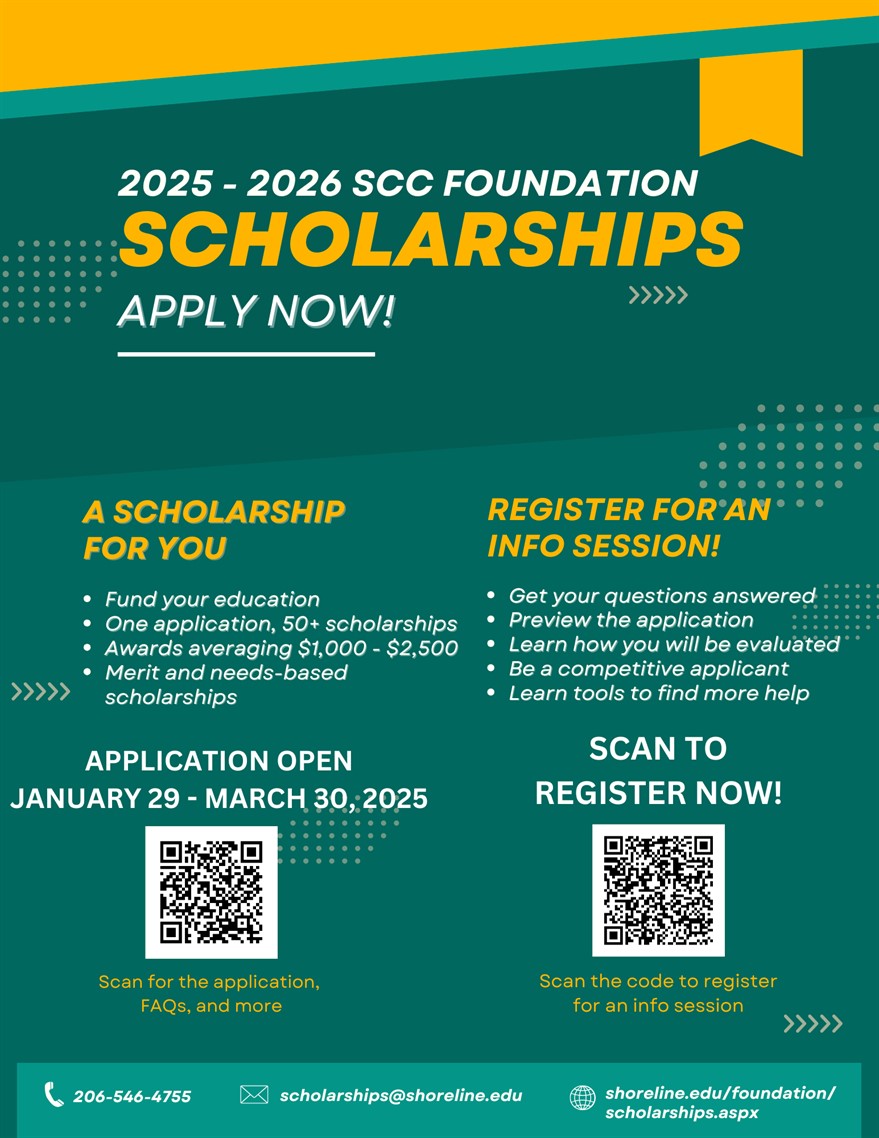
Each year the Shoreline Community College Foundation awards over 200 scholarship awards to students attending Shoreline Community College. Scholarship awards typically range from $1,000 to $2,500.
We highly encourage all students to apply, including full and part time students, Running Start students, international students, and undocumented students.
SCHOLARSHIP INFO SESSIONS AND WORKSHOPS:
The Shoreline Community College Foundation will be hosting scholarship info sessions over the next few weeks. These will include time to go over the application and advice on how to be a competitive applicant. Register for an info session.
Click the “Start Application” button to begin filling out your application.
Click the “Submit Application” button in the lower right corner (Note: The “Submit Application” button is disabled until the application is complete).
You may be eligible for some scholarships that require additional information. The Dashboard will prompt you if you need to provide this additional information by showing a number in the “Items requiring completion” box.
After completing all follow-up items for the scholarship, click the “Resubmit Application” button to submit your application (Note: If there are no follow-up items that need to be completed, you do not need to resubmit your application).
Note: An application for Shoreline Community College Foundation scholarships does not take the place of the Financial Aid application. All students, excluding international students, are encouraged to complete the FAFSA (Free Application for Federal Student Aid) or the WASFA (for HB 1079 students) application for the current year, in addition to the scholarship application. For information about financial aid, visit our Financial Aid webpage, or email financialaid@shoreline.edu.
Come learn about SCC Foundation scholarships while eating a delicious bowl of ramen. Students will get a chance to learn about annual and quarterly scholarships, get help in starting their application, and how to stand out as an applicant. There will be a ramen bar included with noodles, veggies, and protein. Vegan + Gluten Free options available.
Registration is encouraged. Follow the QR code below to register.
Date: Thursday 10/24
Time: 2:30-4:00pm
Location: 9000 Building (PUB), Quiet Dining Rom (9208)
Click the “Start Application” button to begin filling out your application.
Click the “Submit Application” button in the lower right corner (Note: The “Submit Application” button is disabled until the application is complete).
You will be directed back to your Dashboard where you will see the number of scholarships to which you have been automatically applied.
You may be eligible for additional scholarships that require additional information. The Dashboard will prompt you to provide this by showing a number in the “Items requiring completion” box.
After completing all follow-up items for the scholarship, click the “Resubmit Application” button to submit your application (Note: If there are no follow-up items that need to be completed, you do not need to resubmit your application).
Please Note: An application for Shoreline Community College Foundation scholarships does not take the place of the Financial Aid application. All students, excluding international students, are encouraged to complete the FAFSA (Free Application for Federal Student Aid) or the WASFA (for HB 1079 students) application for the current year, in addition to the scholarship application. For information about financial aid, visit our Financial Aid webpage, or email financialaid@shoreline.edu.
Click the “Start Application” button to begin filling out your application.
Click the “Submit Application” button in the lower right corner (Note: The “Submit Application” button is disabled until the application is complete).
You will be directed back to your Dashboard where you will see the number of scholarships to which you have been automatically applied.
You may be eligible for additional scholarships that require additional information. The Dashboard will prompt you to provide this by showing a number in the “Items requiring completion” box.
After completing all follow-up items for the scholarship, click the “Resubmit Application” button to submit your application (Note: If there are no follow-up items that need to be completed, you do not need to resubmit your application).
Note: An application for Shoreline Community College Foundation scholarships does not take the place of the Financial Aid application. All students, excluding international students, are encouraged to complete the FAFSA (Free Application for Federal Student Aid) or the WASFA (for HB 1079 students) application for the current year, in addition to the scholarship application. For information about financial aid, visit our Financial Aid webpage, or email financialaid@shoreline.edu.
Click the “Start Application” button to begin filling out your application.
Click the “Submit Application” button in the lower right corner (Note: The “Submit Application” button is disabled until the application is complete).
You will be directed back to your Dashboard where you will see the number of scholarships to which you have been automatically applied.
You may be eligible for additional scholarships that require additional information. The Dashboard will prompt you to provide this by showing a number in the “Items requiring completion” box.
After completing all follow-up items for the scholarship, click the “Resubmit Application” button to submit your application (Note: If there are no follow-up items that need to be completed, you do not need to resubmit your application).
Note: An application for Shoreline Community College Foundation scholarships does not take the place of the Financial Aid application. All students, excluding international students, are encouraged to complete the FAFSA (Free Application for Federal Student Aid) or the WASFA (for HB 1079 students) application for the current year, in addition to the scholarship application. For information about financial aid, visit our Financial Aid webpage, or email financialaid@shoreline.edu.
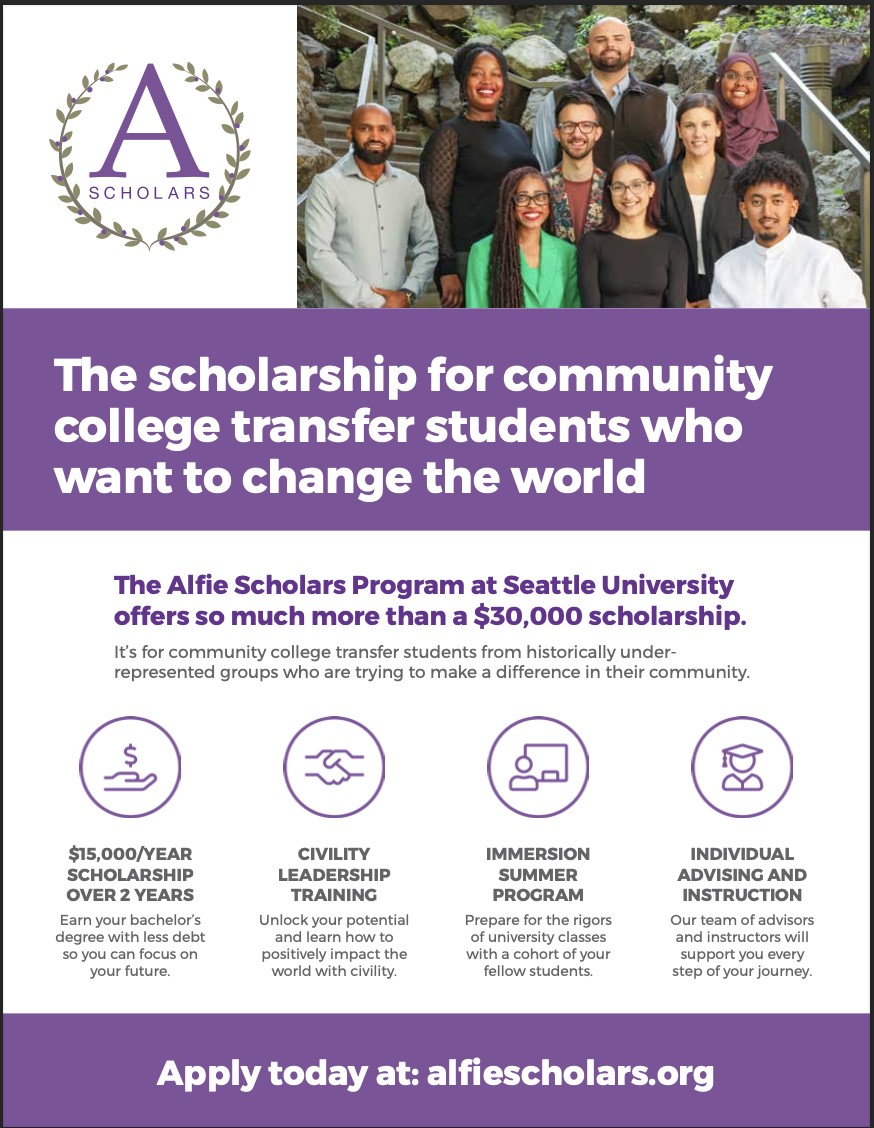
Join the Honors College to learn more about the Alfie Scholars Program at Seattle University. Carol Cochran, Director Alfie Scholars at Seattle University, will join us in the Honors Lounge from Noon to 1pm to explain the Alfie Scholars program (https://www.alfiescholars.org/).
This is a reminder that the Shoreline Community College Foundation’s annual 2024-2025 scholarship application is open through March 29, 2024. See the instructions below on how to apply.
Click the “Start Application” button to begin filling out your application.
Click the “Submit Application” button in the lower right corner (Note: The “Submit Application” button is disabled until the application is complete).
You will be directed back to your Dashboard where you will see the number of scholarships to which you have been automatically applied.
You may be eligible for additional scholarships that require additional information. The Dashboard will prompt you to provide this by showing a number in the “Items requiring completion” box.
After completing all follow-up items for the scholarship, click the “Resubmit Application” button to submit your application (Note: If there are no follow-up items that need to be completed, you do not need to resubmit your application).
Note: An application for Shoreline Community College Foundation scholarships does not take the place of the Financial Aid application. All students, excluding international students, are encouraged to complete the FAFSA (Free Application for Federal Student Aid) or the WASFA (for HB 1079 students) application for the current year, in addition to the scholarship application. For information about financial aid, visit our Financial Aid webpage, or email financialaid@shoreline.edu.